Creating & Executing a Swap
This page covers the core swap lifecycle that every direction follows: create → poll → sign → submit → repeat until finished. Bitcoin- and Lightning-specific details (PSBT building, LNURL, preimage reveal) are split into Bitcoin & Lightning Specifics.
This page covers the minimum needed to create and execute a swap. If you're building a complete swap form (e.g. token pickers, "Max" button, amount limit validation, recipient address parsing), see Quoting Swaps first to populate the form inputs.
Create the swap
Use POST /createSwap to create a new swap:
curl -X POST "https://mainnet.swaps-api.atomiq.exchange/createSwap" \
  -H "Content-Type: application/json" \
  -d '{
    "srcToken":   "BITCOIN-BTC",
    "dstToken":   "STARKNET-STRK",
    "amount":     "150000",
    "amountType": "EXACT_IN",
    "srcAddress": "bc1q…",
    "dstAddress": "0x0123…"
  }'
For Bitcoin / Lightning → Smart chain swaps, you can also request a destination-chain gas drop by passing gasAmount; see Gas-drop.
This creates a swap of 0.0015 BTC (150,000 sats) to STRK token. Note that amount is in base units (sats for Bitcoin, wei for EVM, etc.), and the amount type can be either EXACT_IN or EXACT_OUT, based on whether the amount field specifies an input amount or output amount. For some swap types (e.g. Lightning → Smart chain and Bitcoin → Smart chain) the srcAddress can be left empty.
For Lightning → Smart chain swaps, you also need to create a swap secret and paymentHash pair.
First generate a cryptographically secure random 32-byte buffer, this is your swap secret, then hash this secret using sha256 hash function to derive a payment hash. Store the swap secret securely for later reveal (i.e. in the browser local storage).
const secret: Buffer = crypto.randomBytes(32);
const paymentHash: string = crypto.createHash("sha256").update(secret).digest("hex");
// Store the preimage, i.e. in browser storage
Then pass the hex-encoded payment hash to the POST /createSwap API as a paymentHash parameter.
The response is a swap record — the same shape every subsequent GET /getSwapStatus call will return (see the REST API Reference for the full response schema):
{
  "swapId":   "54cbe34e2ee1bf...",
  "swapType": "SPV_VAULT_FROM_BTC",
  "state":    { "number": 1, "name": "CREATED", "description": "..." },
  "quote":    {
    "inputAmount":  { "amount": "0.0015",      "rawAmount": "150000", ... },
    "outputAmount": { "amount": "4.21",        "rawAmount": "4210000000000000000", ... },
    "fees":         { "swap": { ... }, "networkOutput": { ... } },
    "expiry":       1713360000000,
    "outputAddress": "0x0123..."
  },
  "createdAt": 1713359700000,
  "steps":    [ ... ]
}
Gas-drop
For Bitcoin / Lightning → Smart chain swaps you can optionally request a small portion of the swap amount to be swapped into destination chain's native gas token (e.g. STRK on Starknet, CBTC on Citrea, ...). This is useful for providing new wallets with some native token balance to cover transaction fees, such that they can start interacting with other dApps on the network immediately.
To request a gas drop set the gasAmount parameter (base-unit string, same convention as amount) when creating the swap with POST /createSwap, the gas drop is usually not available when already swapping to the native token of the chain (it is anyway only useful when you swap to a non-native token):
curl -X POST "https://mainnet.swaps-api.atomiq.exchange/createSwap" \
  -H "Content-Type: application/json" \
  -d '{
    "srcToken":   "BITCOIN-BTC",
    "dstToken":   "STARKNET-WBTC",
    "amount":     "150000",
    "amountType": "EXACT_IN",
    "srcAddress": "bc1q…",
    "dstAddress": "0x0123…",
    "gasAmount": "10000000000000000000"
  }'
This creates a swap of 150,000 sats (0.0015 BTC) from Bitcoin into WBTC and also adds a 10 STRK gas drop on Starknet. The 10 STRK gas drop value is subtracted from the output WBTC amount (as part of the swap value was converted into the STRK).
Requesting gas-drop also affects spendable-balance math; see Quoting Swaps → Spendable balance.
Poll for the current action
The full reference implementation of the polling loop, handling all the actions in TypeScript can be found at scripts/process-swap.ts in the atomiq-api-docker repo.
The swap process might include multiple actions that must be executed sequentially, you should therefore call GET /getSwapStatus in a polling loop, which returns the current action that the user should execute.
curl "https://mainnet.swaps-api.atomiq.exchange/getSwapStatus?swapId=<id>"
For Bitcoin → Smart chain swaps, pass bitcoinAddress + bitcoinPublicKey on every call as the API needs them to build funded PSBTs.
curl "https://mainnet.swaps-api.atomiq.exchange/getSwapStatus?swapId=<id>&bitcoinAddress=<addr>&bitcoinPublicKey=<hex>"
The response extends the swap record with four boolean flags and a currentAction, which indicates the action, that has to be executed by the user.
{
  /* ... all swap-record fields ... */
  "isFinished":       false,
  "isSuccess":        false,
  "isFailed":         false,
  "isExpired":        false,
  "currentAction":    { "type": "SignPSBT", /* ... */ },
  "requiresSecretReveal": false
}
When isFinished === true, stop polling. See Terminal states below for what the other three flags mean.
For Lightning → Smart chain swaps, the requiresSecretReveal parameter indicates when the swap secret should be revealed. To reveal the swap secret, include the secret parameter in the subsequent GET /getSwapStatus calls:
curl "https://mainnet.swaps-api.atomiq.exchange/getSwapStatus?swapId=<id>&secret=<hex-encoded swap secret>"
The returned currentAction, uses the SerializedAction schema, and is one of the following four shapes, which correspond to types that the client should branch on:
SignPSBT
Reference: SerializedActionSignPSBT
Here, the API has built a Bitcoin PSBT for the user's deposit and needs the client's wallet to sign the PSBT, then return the signed PSBT back to the API.
{
  "type": "SignPSBT",
  "chain": "BITCOIN",
  "name": "Deposit on Bitcoin",
  "description": "Sign the funding transaction to commit the deposit.",
  "pollTimeSeconds": 5,
  "txs": [
    {
      "type": "FUNDED_PSBT",
      "psbtHex":    "70736274ff0100…ac0000000000",
      "psbtBase64": "cHNidP8BAH0CAAA…rAAAAAAA=",
      "signInputs": [0, 2],
      "feeRate": 3.5
    }
  ]
}
For each PSBT in action.txs, sign the inputs listed in signInputs with the user's Bitcoin wallet and post the signed PSBTs back to POST /submitTransaction, for the API to broadcast the transaction. I.e. in this example the client should parse the PSBT from its psbtHex or psbtBase64, sign inputs with indexes 0 and 2.
In case you didn't supply bitcoinAddress + bitcoinPublicKey on GET /getSwapStatus the endpoint, returns the RAW_PSBT objects in action.txs instead of FUNDED_PSBT, and the client must add its own inputs (coin-selection) before signing — see Bitcoin & Lightning → PSBT signing.
Submit each signed PSBT as a hex or base64 encoded string. Order of the PSBTs in signedTxs must match the order in action.txs:
curl -X POST "https://mainnet.swaps-api.atomiq.exchange/submitTransaction" \
  -H "Content-Type: application/json" \
  -d '{
    "swapId": "0x9f3c…",
    "signedTxs": ["70736274ff01..."]
  }'
The response contains the broadcasted Bitcoin transaction IDs:
{ "txHashes": ["a1b2c3d4e5f6…"] }
SignSmartChainTransaction
Reference: SerializedActionSignSmartChainTransaction
Here, the API has pre-built smart chain (i.e. non-Bitcoin: EVM, Solana, Starknet, etc.) transactions and needs the user's smart chain wallet to sign them.
{
  "type": "SignSmartChainTransaction",
  "chain": "SOLANA",
  "name": "Commit on Solana",
  "description": "Sign and submit the escrow-funding transaction.",
  "pollTimeSeconds": 3,
  "txs": [
    "{\"tx\":\"01a4f1b2...\",\"signers\":[\"7c983c019e...\"],\"lastValidBlockheight\":345678901}"
  ]
}
Each entry of action.txs is a serialized unsigned transaction whose shape depends on action.chain:
Solana
Uses a JSON-stringified envelope, with the shape { tx, signers, lastValidBlockheight } where tx is a hex-encoded legacy Transaction, signers is an array of hex-encoded secret keys for any ephemeral co-signers that also need to sign the transaction, and lastValidBlockheight is the transaction expiration block height. Use the partialSign(), as the LP may already have co-signed the transaction (see the code example below).
Starknet
Uses a JSON-stringified envelope, with the shape { type, tx, details, ... }. type is either INVOKE (regular call) or DEPLOY_ACCOUNT (first-time account deployment). For INVOKE, build the signed invocation from tx + details. For DEPLOY_ACCOUNT, you need to build the deployment payload yourself (the API can't know your account class) using the supplied details (fees, nonce). Convert every resourceBounds.*.* value to BigInt before signing. Populate parsed.signed and re-stringify (use a BigInt → string replacer).
EVM (Citrea / Alpen / Goat)
Uses a hex-serialized unsigned EVM transaction, with pre-populated nonce and fees, ready to be signed by the EVM wallet.
Code example handling the smart chain signing action:
import {Transaction as SolanaTransaction} from "@solana/web3.js";
import {Transaction as EthersTransaction} from "ethers";

const signedTxs: string[] = [];
for (const tx of action.txs) {
  switch (action.chain) {
    case "SOLANA": {
      const parsed = JSON.parse(tx);
      const extraSigners = parsed.signers.map((k: string) =>
        Keypair.fromSecretKey(Buffer.from(k, "hex")),
      );
      const solTx = SolanaTransaction.from(Buffer.from(parsed.tx, "hex"));
      solTx.lastValidBlockHeight = parsed.lastValidBlockheight;
      solTx.partialSign(solanaWallet, ...extraSigners);   // preserves LP sig
      signedTxs.push(solTx.serialize().toString("hex"));
      break;
    }
    case "STARKNET": {
      const parsed = JSON.parse(tx);
      // Coerce resourceBounds back to BigInt
      for (const t in parsed.details.resourceBounds)
        for (const p in parsed.details.resourceBounds[t])
          parsed.details.resourceBounds[t][p] = BigInt(parsed.details.resourceBounds[t][p]);

      if (parsed.type === "INVOKE") {
        parsed.signed = await starknetWallet.buildInvocation(parsed.tx, parsed.details);
      } else if (parsed.type === "DEPLOY_ACCOUNT") {
        // API can't know your account class — build the deployment payload yourself.
        parsed.signed = await starknetWallet.buildAccountDeployPayload(
          starknetWalletDeploymentPayload,
          parsed.details,
        );
      }
      signedTxs.push(JSON.stringify(parsed, (_, v) => typeof v === "bigint" ? v.toString() : v));
      break;
    }
    default: { // EVM chains
      const parsedTx = EthersTransaction.from(tx);
      signedTxs.push(await evmWallet.signTransaction(parsedTx));
      break;
    }
  }
}
After signing, submit the signed payloads. Encoding per chain: hex-encoded signed transaction for Solana and EVM; JSON-stringified envelope (with signed populated) for Starknet.
curl -X POST "https://mainnet.swaps-api.atomiq.exchange/submitTransaction" \
  -H "Content-Type: application/json" \
  -d '{
    "swapId": "9f3c...",
    "signedTxs": ["21b12eea..."]
  }'
Smart chain transaction submission endpoint usually waits for the smart chain transaction to confirm before responding, ensure you call the POST /submitTransaction with a long enough timeout, to accommodate transaction confirmation delays.
The response contains transaction IDs of the submitted and broadcasted transactions:
{ "txHashes": ["3KZv8Fq..."] }
SendToAddress
Reference: SerializedActionSendToAddress
Here, the user has to pay to either an on-chain Bitcoin address or a BOLT11 Lightning invoice.
{
  "type": "SendToAddress",
  "name": "Pay Lightning invoice",
  "description": "Pay the BOLT11 invoice from any Lightning wallet.",
  "pollTimeSeconds": 5,
  "expectedTimeSeconds": 60,
  "txs": [
    {
      "name":    "Lightning payment",
      "address": "lnbc1500n1p3z7...",
      "hyperlink": "lightning:lnbc1500n1p3z7...",
      "amount":  { "amount": "0.00015", "symbol": "BTC" }
    }
  ]
}
Show the address and amount from each entry of action.txs to the user (or use a hyperlink, which can be displayed as a QR code, or used as clickable deeplink) and let them pay from whichever wallet they like. Keep polling GET /getSwapStatus; the server detects the incoming payment and advances the state automatically.
A Lightning → Smart chain swap can also be settled via LNURL-withdraw instead of asking the user to pay an invoice — use the LNURL-withdraw settlement instead.
Wait
Reference: SerializedActionWait
Here, there's nothing actionable right now — the API is waiting for confirmations, a counterparty action, or a timer to elapse.
{
  "type": "Wait",
  "name": "Waiting for confirmations",
  "description": "1/3 confirmations seen. ETA ~30 min.",
  "expectedTimeSeconds": 1800,
  "pollTimeSeconds": 30
}
Wait pollTimeSeconds and call GET /getSwapStatus again. Use expectedTimeSeconds to render an ETA in the UI.
Terminal states
A swap is finished when isFinished === true. The terminal state is described by three additional flags:
| Flag | Meaning |
|---|---|
isSuccess | The swap completed successfully and the user received the destination token. |
isFailed | The swap failed after funds were committed — typically results in a refund flow. |
isExpired | The quote expired before the user paid. No on-chain state was created. |
Once isFinished is true, stop polling. These flags are mutually exclusive.
Lifecycle overview
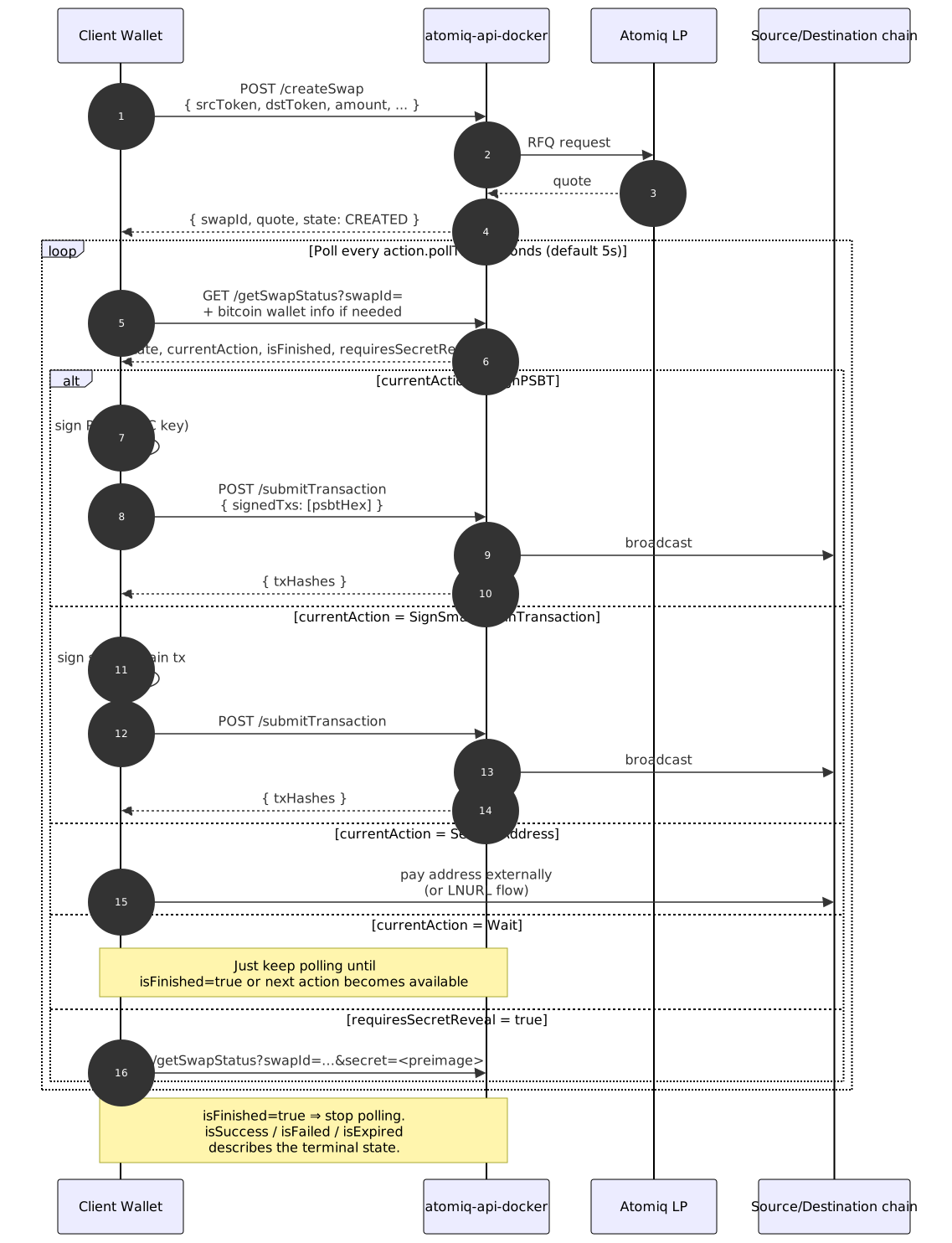
Swap execution steps
Every swap record carries a steps array alongside the action-level state, which is a UX hint describing the swap as a linear sequence of stages — good for rendering the swap progress. The actionable state still lives in currentAction. Individual steps in the array use the SwapExecutionStep schema, which always contains a status field, plus additional fields based on the type:
type | Meaning | Statuses | Additional fields |
|---|---|---|---|
Setup | Destination-side setup (e.g. creating the destination HTLC / escrow). | awaiting, completed, soft_expired, expired | setupTxId |
Payment | The user's payment that initiates or funds the swap on the source side. | inactive, awaiting, received, confirmed, soft_expired, expired | initTxId, settleTxId, confirmations? (BTC-only) |
Settlement | Payout / settlement on the destination side. | inactive, waiting_lp, awaiting_automatic, awaiting_manual, soft_settled, soft_expired, settled, expired | initTxId, settleTxId |
Refund | Source-side refund path after a failed swap. | inactive, awaiting, refunded | refundTxId |
// Example step — Bitcoin payment being confirmed
{
  "type":        "Payment",
  "side":        "source",
  "chain":       "BITCOIN",
  "title":       "Bitcoin deposit",
  "description": "Waiting for 3 block confirmations.",
  "status":      "received",
  "confirmations": { "current": 1, "target": 3, "etaSeconds": 1200 },
  "initTxId":    "a1b2…"
}
Next Steps
Bitcoin & Lightning
Handling Bitcoin-specific bits (PSBT inputs, fee rates), Lightning invoices, and LNURL settlement.
Bitcoin & Lightning Specifics →
Listing Swaps
Listing swap history, pending swaps that need user attention, resuming mid-flight swaps after restart, and handling refunds.